DHL SHIPMENT TRACKING: HOW TO USE A WAYBILL NUMBER AND READ STATUS UPDATES
DHL tracking allows you to check whether a shipment has been collected, where it was last processed, whether it has reached Vietnam and what may happen next.
To track a DHL shipment through the ASC Logistics website, select DHL in the “TRACK YOUR SHIPMENT” module, enter the complete waybill number and click “TRACK-TRACE”.
The tracking results will show the latest shipment status, update time, origin, destination and detailed handling events.
DHL operates several business divisions, including DHL Express, DHL eCommerce, DHL Freight and DHL Global Forwarding. Tracking-number formats and tracking systems may vary between divisions. This guide primarily applies to DHL Express shipments and the DHL interface shown in the accompanying images.
Key takeaways:
- A DHL Express waybill number normally contains 10 digits;
- The number is usually printed below or close to the main barcode;
- Check the status together with its time, time zone, location and detailed message;
- One waybill may contain several Piece IDs with different statuses;
- “Customs clearance status updated” does not automatically mean that customs clearance is complete;
- Tracking displays scan and handling events, not continuous GPS positioning.
What information should you check when tracking a DHL shipment?
When reviewing a tracking result, check the following information together:
- Tracking Code or Waybill Number;
- Latest shipment status;
- Date, time and UTC time zone;
- Location of the latest event;
- Shipment Timeline;
- Event Log;
- Detailed instructions or requests for action;
- Individual Piece IDs for multi-piece shipments.
A short status label may have different operational implications depending on the detailed message underneath it. ASC Logistics therefore recommends reading the complete event instead of relying on the status heading alone.
Where can you find the DHL waybill number?
On a DHL Express waybill, look for a number labelled “WAYBILL”, “Waybill No.”, “AWB No.” or “Tracking No.”
A DHL Express waybill number normally contains 10 digits and is usually printed immediately below or close to the main barcode.
When entering the number:
- Type all 10 digits continuously;
- Remove any spaces between the digits;
- Do not add full stops or hyphens;
- Do not enter a DHL account number;
- Do not enter an invoice number;
- Do not use the shipper’s reference number instead of the waybill number;
- Do not confuse an individual Piece ID with the shipment waybill number.
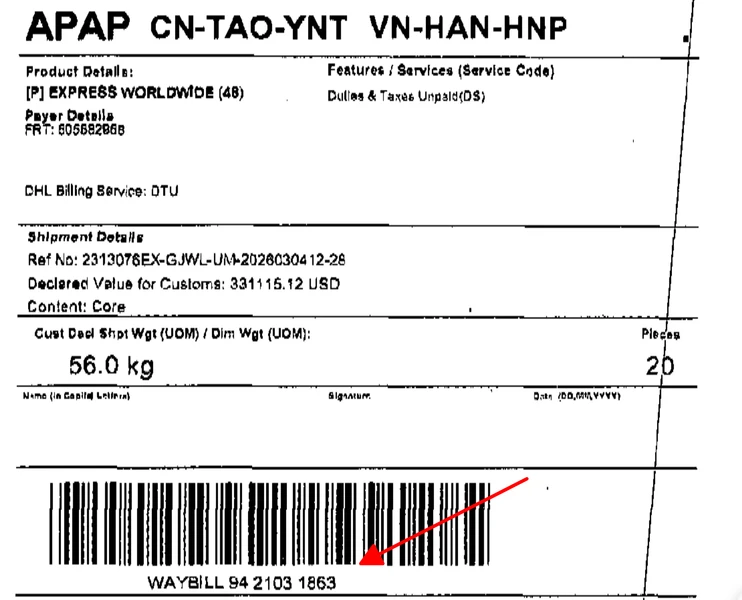
The DHL Express waybill number is printed below the main barcode and identified by the word “WAYBILL”.
In the example above, the number appears as “WAYBILL 94 2103 1863”. Enter it into the tracking field as 9421031863, without spaces.
The term “waybill” in this guide refers to the number used to track the DHL shipment. It should not automatically be treated as a Master Air Waybill, House Air Waybill or Bill of Lading without checking the carrier, transport mode and document type.
How do you track a DHL shipment through ASC Logistics?
You can track a DHL shipment through the ASC Logistics homepage in four steps.
Step 1: Open the ASC Logistics homepage
Visit the ASC Logistics homepage and locate the “TRACK YOUR SHIPMENT” module.
Step 2: Select DHL
Open the carrier selection field and select “DHL”.
Step 3: Enter the DHL waybill number
Enter the complete DHL waybill number in the tracking field.
Check that no digit is missing and that the number does not contain unnecessary spaces.
Step 4: Submit the tracking request
Click “TRACK-TRACE” to open the DHL tracking results.
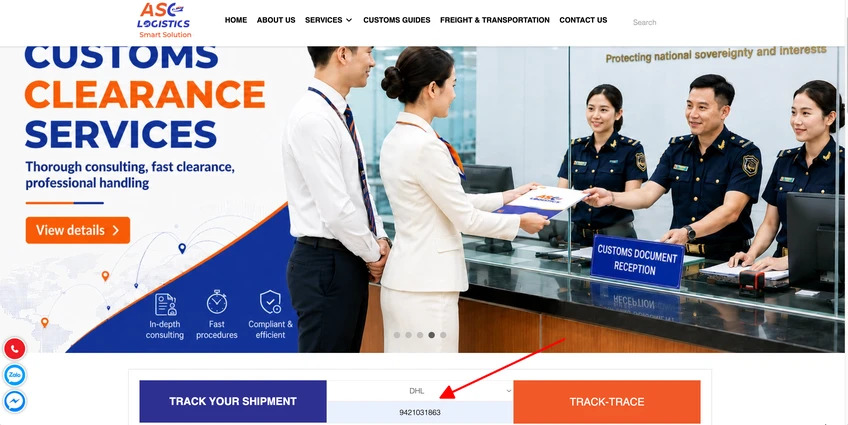
Select DHL, enter the complete waybill number and click “TRACK-TRACE”.
ASC Logistics provides the tracking entry point. The shipment events, locations and statuses displayed in the results are returned by the DHL tracking system.
If no result appears, check whether:
- The tracking number has been entered correctly;
- A digit is missing;
- The number contains an unnecessary space;
- The correct DHL business division has been selected;
- DHL has physically received the shipment;
- The shipment has received its first network scan.
According to the DHL tracking FAQ, tracking events usually appear within 24–48 hours of receiving the Track and Trace ID. In general, the first event appears after the shipment reaches a DHL facility.
How do you read the DHL tracking result?
After submitting the waybill number, first review the shipment summary at the top of the results page.
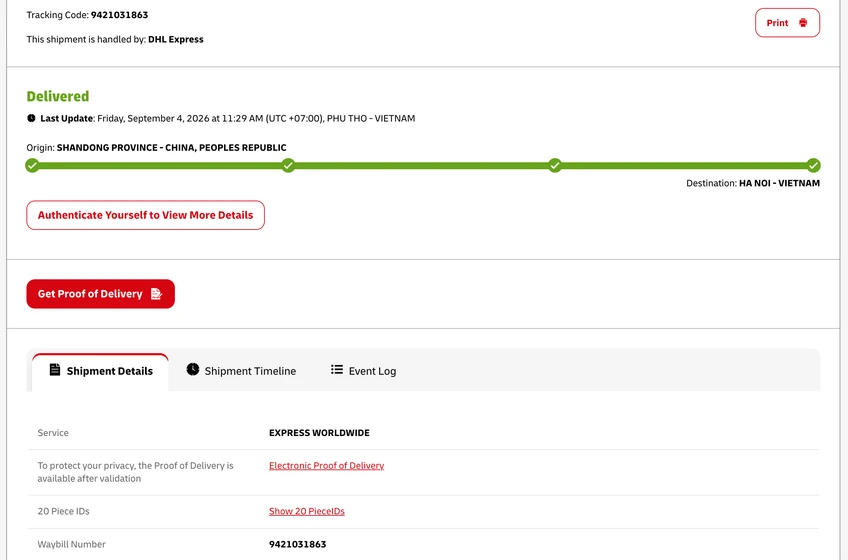
The top section displays the tracking code, latest status, last update, origin and destination.
Tracking Code
The “Tracking Code” is the number used to retrieve the shipment record.
In the example shown, the tracking code is 9421031863.
DHL business division
The message “This shipment is handled by: DHL Express” confirms that the shipment is being handled by DHL Express.
This distinction is important because DHL Express, DHL eCommerce, DHL Freight and DHL Global Forwarding may use different tracking-number formats and systems.
Latest status
The green “Delivered” status indicates that the DHL system has recorded a delivery event for the shipment or the relevant pieces.
For a multi-piece shipment, open the Piece ID list before concluding that every piece has been delivered.
Last Update
The “Last Update” field shows the date, local time, UTC time zone and location of the most recent event.
For example:
Friday, 4 September 2026 at 11:29 AM (UTC+07:00), PHU THO – VIETNAM
Vietnam uses the UTC+07:00 time zone. When comparing events recorded in different countries, check the time zone as well as the displayed time.
Origin and destination
The summary also displays the shipment’s origin and destination:
- Origin: SHANDONG PROVINCE – CHINA, PEOPLE’S REPUBLIC;
- Destination: HA NOI – VIETNAM.
Locations recorded between the origin and destination may be DHL transit, sorting or operational points. A scan in another country does not necessarily mean that the shipment’s destination has changed.
Identity verification and Proof of Delivery
The “Authenticate Yourself to View More Details” button allows authorised users to access additional shipment information after completing identity verification.
The “Get Proof of Delivery” button is used to obtain delivery evidence when available.
In this context, Proof of Delivery means evidence that the shipment was delivered. It should not be confused with Port of Discharge, which may also be abbreviated as POD in sea-freight documents.
What does the “Shipment Details” tab show?
The “Shipment Details” tab contains information such as:
- DHL service type;
- Waybill number;
- Number of Piece IDs;
- Electronic Proof of Delivery;
- Privacy or identity-verification information.
The example shipment contains 20 Piece IDs.
One DHL waybill may cover several individual pieces. Those pieces can receive different scans and statuses. For multi-piece shipments, click “Show 20 PieceIDs” or the corresponding link to review each piece separately.
How do you read the “Shipment Timeline”?
The “Shipment Timeline” arranges the shipment’s handling events in chronological order.
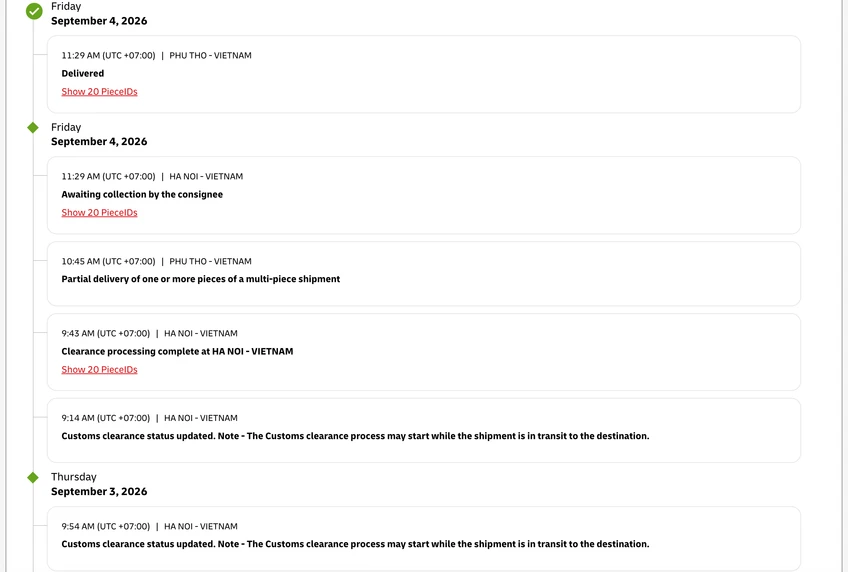
The Shipment Timeline displays each event with its date, time, location and status.
Each timeline entry normally includes:
- Date;
- Local time;
- UTC time zone;
- Event location;
- Shipment status;
- Affected Piece IDs.
Start with the latest event at the top. Then read down the timeline to reconstruct the shipment’s earlier movements and handling stages.
Delivered
“Delivered” means that the DHL system has recorded a completed delivery event for the shipment or the relevant pieces.
For a multi-piece shipment, check the Piece ID list to confirm whether all pieces were delivered.
Awaiting collection by the consignee
“Awaiting collection by the consignee” means that the shipment or relevant pieces are waiting to be collected by the consignee.
The consignee should review the detailed instructions and confirm:
- Collection location;
- Available collection time;
- Required identification;
- Whether the waybill number or another document is required;
- Which Piece IDs are ready for collection.
Partial delivery of one or more pieces of a multi-piece shipment
This status means that at least one piece has been delivered while other pieces may still be in transit, undergoing customs processing or awaiting collection.
Do not treat the whole shipment as delivered until the individual Piece IDs have been checked.
Clearance processing complete at HA NOI – VIETNAM
“Clearance processing complete at HA NOI – VIETNAM” indicates that DHL has recorded completion of the displayed clearance-processing stage in Hanoi.
This status does not mean that final delivery has been completed. The shipment may still require sorting, domestic transfer or last-mile delivery.
Customs clearance status updated
The complete DHL message may state:
“Customs clearance status updated. Note – The Customs clearance process may start while the shipment is in transit to the destination.”
This means that new customs-related information has been recorded. Customs-data review or processing may begin while the shipment is still moving towards its destination.
“Customs clearance status updated” does not automatically mean that the shipment has cleared customs. Read the detailed message and check whether DHL requires the shipper or consignee to provide additional information.
How do you read the “Event Log”?
The “Event Log” displays the shipment’s detailed handling history in a table.
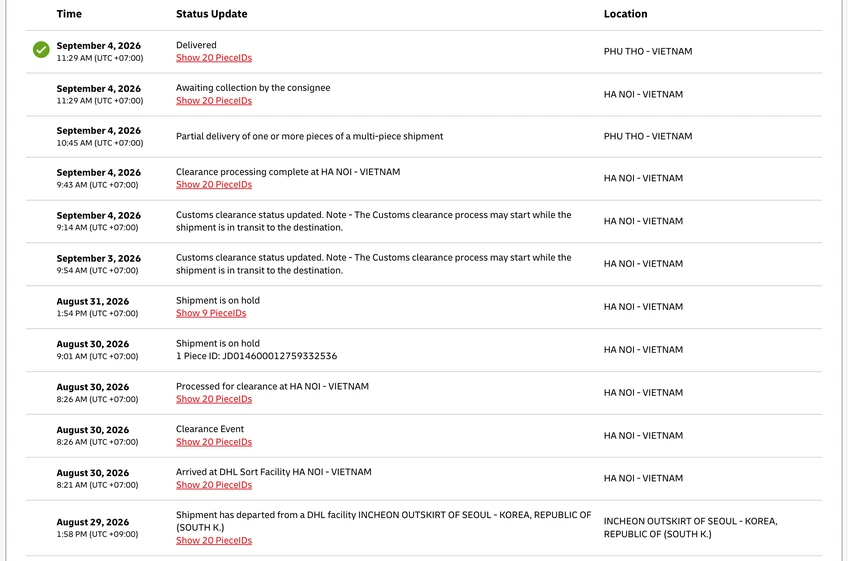
The Event Log helps users check the exact time, status and location of each recorded event.
The table contains three main columns:
- Time;
- Status Update;
- Location.
The Event Log is particularly useful when the shipper, consignee or documentation team needs to verify when and where a specific scan occurred.
Before sharing a screenshot publicly, conceal the complete waybill number, Piece IDs, personal names, addresses and telephone numbers.
Shipment is on hold
“Shipment is on hold” means that the shipment has temporarily stopped moving at a DHL facility or another operational point.
Possible causes may include:
- Operational processing;
- Missing or incomplete documents;
- Payment matters;
- Address verification;
- Customs-related requirements;
- Weather or network disruption.
This status does not automatically mean that customs has detained the shipment. Read the detailed message and check whether action is required.
Processed for clearance at HA NOI – VIETNAM
This status indicates that the shipment has entered or passed through a customs-clearance processing stage at the displayed location.
Do not assume that the shipment has been released unless a later event or the detailed message confirms it.
Clearance Event
“Clearance Event” means that DHL has recorded an event relating to customs clearance.
Open the detailed message to determine whether:
- DHL is reviewing existing information;
- The shipper needs to provide documents;
- The consignee needs to provide information;
- Another party needs to take action.
Arrived at DHL Sort Facility
“Arrived at DHL Sort Facility” means that the shipment has reached a DHL sorting facility.
The next event may involve sorting, customs processing, transfer to another facility or last-mile delivery.
What do common DHL tracking statuses mean?
Status names may vary by DHL division, country and interface. The explanations below describe their usual operational meaning and do not replace the detailed message shown for a particular shipment.
| DHL status | What it usually means | Recommended action |
|---|---|---|
| Shipment Information Received | Shipment data has been created, but the goods may not yet have been physically handed to DHL | Wait for the first scan; contact the shipper if the status remains unchanged |
| Processed / In transit | The shipment has passed through an operational point or is moving through the DHL network | Monitor the next event; do not infer a confirmed flight or delivery time |
| Customs Clearance Status Updated | New customs-related information has been recorded | Read the detailed message and prepare information if requested |
| Processed for clearance | The shipment has entered a customs-clearance processing stage | Continue monitoring; do not assume release until confirmed |
| Clearance processing complete | DHL has recorded completion of the displayed clearance-processing stage | Check the next event; this does not mean final delivery |
| Clearance Event | An event relating to customs processing has been recorded | Open the details and check whether action is required |
| Shipment is on hold | The shipment has temporarily stopped at an operational point | Check the reason and respond if DHL requests action |
| Awaiting collection by the consignee | The shipment is waiting for collection by the consignee | Confirm the collection point, requirements and affected Piece IDs |
| Partial delivery of one or more pieces | Some pieces have been delivered while others remain outstanding | Review each Piece ID separately |
| With delivery courier / Out for delivery | The shipment has entered the last-mile delivery stage | Arrange for the consignee to receive the shipment |
| Delivered | DHL has recorded a delivery event | Confirm the recipient and obtain Proof of Delivery if required |
Does arrival in Vietnam mean that the shipment is ready for collection?
Not necessarily.
A tracking event showing that the shipment has reached Vietnam only confirms that it has arrived at a transport or operational point in the country.
The shipment may still require:
- Sorting at a DHL facility;
- Customs-data review;
- Customs declaration;
- Additional documentation;
- Product-specific inspection or quarantine;
- An import licence;
- Payment of applicable charges;
- Domestic transfer;
- Last-mile delivery or consignee collection.
Check the latest status and detailed instructions before arranging collection.
What should a business prepare if a DHL shipment is held in Vietnam?
If the tracking result displays “Clearance Event”, “Shipment is on hold” or a request for additional information, prepare:
- The DHL waybill or tracking number;
- A screenshot of the latest status and detailed message;
- Commercial invoice;
- Packing list;
- Available transport documents;
- Clear goods description;
- Quantity and declared value;
- Country of origin;
- Intended import use;
- Any specific information requested by DHL or the relevant authority.
Tracking only reflects the shipment’s handling progress. It does not independently determine the HS code, taxes, licensing requirements or legal responsibilities of the importer.
These matters depend on the goods, supporting documents, declared use and applicable regulations.
Subject to the agreed scope of work, ASC Logistics can review the available documents and coordinate relevant logistics stages in Vietnam. Businesses may also consult ASC Logistics’ Vietnam customs clearance guidance.
Sources and scope
This guide reflects the DHL Express waybill and tracking screens shown above. Tracking-number formats, field names and status descriptions may vary between DHL business divisions, countries and future interface updates.
Always use the latest detailed information displayed for the individual shipment.
Information checked: 4 September 2026.
For further inquiries, please reach out to Mr. Nguyen Van Thang via phone or WhatsApp at +84 973.266.672.
Prepared by: ASC Logistics.
Technical review assigned to: Mr. Nguyen Van Thang – Operations Director.
Review status: Pending confirmation
Published: 3 September 2021
Last updated: 4 September 2026
Frequently asked questions
Can I track a DHL shipment using the consignee’s name?
An accurate search normally requires a waybill number, tracking ID or another reference accepted by the DHL business division handling the shipment.
If you do not have the tracking number, contact the shipper or online retailer.
Why do I have a DHL tracking number but no tracking events?
DHL states that tracking events usually appear within 24–48 hours of receiving the Track and Trace ID. In general, the first event appears after the shipment reaches a DHL facility.
Does “Shipment is on hold” always mean there is a customs problem?
No.
The hold may relate to operational processing, documents, payment, address confirmation, weather or another shipment-specific matter.
Read the detailed message and contact DHL or the shipper if the system requests action.
Does “Customs clearance status updated” mean that the shipment has cleared customs?
It only means that customs-related information has been updated. Check the detailed message and later events before concluding that customs clearance has been completed.
Even after clearance processing is complete, the shipment may still require sorting, domestic transfer or final delivery.
Why can “Delivered” and “Awaiting collection by the consignee” appear under the same waybill?
Open the Piece ID list to confirm which pieces have been delivered and which are still waiting for collection.
How can I confirm who received a delivered DHL shipment?
DHL may require you to select “Authenticate Yourself to View More Details” and complete identity verification before protected information becomes available.
Is the Shipment Timeline a live GPS location?
The Shipment Timeline contains scans and handling events recorded at DHL operational points. It does not continuously display the vehicle’s or shipment’s live geographical position.
What should I do if the DHL status has not changed for a long time?
Date and time;
UTC time zone;
Location;
Status description;
Request for shipper or consignee action.
If no new event appears after an unusually long period, prepare the waybill number and relevant screenshots before contacting the shipper or the DHL division handling the shipment.
Processing time can be affected by the route, flight or vehicle arrangements, customs processing, weather, public holidays and shipment-specific conditions.
Related Products


Tags: DHL tracking, DHL waybill tracking, DHL shipment tracking, DHL tracking number, track DHL shipment, DHL Express tracking, DHL shipment status